UI tests: Debug failures#
It can be difficult to debug failures in UI tests from the logs alone. Playwright offers a rich visual reporting interface that you can use to make this easier.
Download the test report#
1) Open the failed GitHub Actions run#
In your PR, at the very bottom of the “Conversation” tab, you can see failed checks. UI tests are part of the integration tests jobs. Look for failed jobs like:
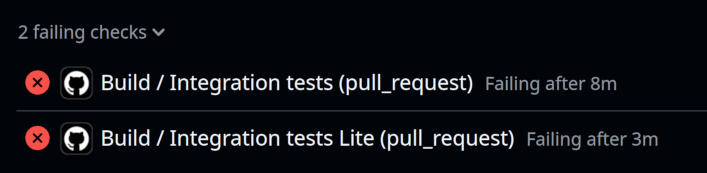
Click on one of these jobs, and you should be taken to the place in the job log where the failure occurred.
Close the currently open step (you should see a collapsible section header at the top of the screen, with a red X (❌) icon).
2) View the “Upload playwright test report” step#
The “Upload playwright test report” step will be downstream (below) the failed step. It should have a checkmark (✔️) icon.
Click the collapsible header to open it.
3) Download the test report#
At the bottom of the log for the “Upload playwright test report” step, you should see a line like:
Artifact download URL: https://github.com/geojupyter/jupytergis/actions/runs/{some number}/artifacts/{some other number}
Click on the URL to download the test report.
Your browser will download a zip file named jupytergis-playwright-tests.zip.
4) Unzip the test report#
Hint
Before unzipping, you may want to move the zip file to a temporary folder, e.g. a new
folder in /tmp if you’re using MacOS or Linux.
Unzip the file with your tool of choice. For example, on Linux:
unzip jupytergis-playwright-tests.zip
You should see a playwright-report and test-results directory are extracted.
Open the test report with Playwright#
From the directory where you unzipped, run:
pnpm dlx playwright show-report
…to download and execute the playwright report visualization tool. It will immediately open a new browser tab displaying the test report
Warning
Using npx may be significantly less safe than using pnpm dlx.
See Explanation: Security & NPM dependencies for more.
Working with the Playwright test report#
For more on using the test report, view the official Playwright docs page on HTML reports!